
How to Read Your Water Meters in 3 Easy Steps
1. Locate meter box and open lid:
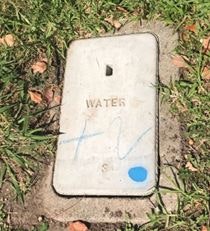
Inside the box, there will be a hockey puck sized component that has “Sensus” written on the top. It will look like this:
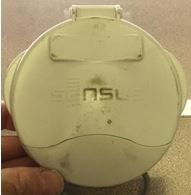
2. Lift the cover and you will see this:
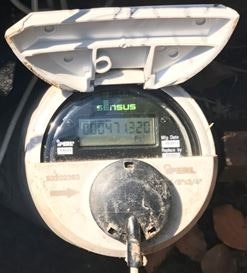
3. Read and convert to the desired unit:
In the LED read, there are 6 digits followed a period and then 3 more digits (xxxxxx.xxx). Numbers to the left of the period are whole numbers, whereas numbers to the right of the period are fractions. Just below this number will be the type of unit the meter is reading. Typically, this will be CF (Cubic Feet) or Ft3 (Cubic Feet) or it could be HCF (Hundred Cubic Feet).
- 1 cubic foot = 7.48 gallons.
- 100 cubic foot = 748 gallons.
- 748 gallons = 1 unit of water.
- 1 acre-foot = 435.6 units of water.
Note: These are smart meters, however on occasion the lid will have to be closed and opened again to “wake up” the meter dial as they go dormant, until awakened by the opening of the lid or someone with a transmitter drives by the area. Transmitting occurs less than one second per month.
Example

Here is an example based on the photo of the meter used throughout this article.
- This meter is reading 471.320 Ft3 or 471.320 cubic feet.
- To convert this into gallons simply multiply by 7.48.
- 471.320 Ft3 X 7.48 = 3525.47 gallons.
- Lastly, to convert the volume into water units (what Casitas uses on its water bills) divide gallons by 748 gallons.
- 3525.47 gallons/748 gallons = 4.7132 units